Free VJ loops are everywhere, and most of the lists that point to them skip the one question that matters when you are paid to play: what does the license actually let you do? A loop that is free to download can still require a credit on screen, forbid use at a commercial event, or come from a site that never had the rights in the first place. This guide covers what "free" means in each of the common licenses, the free sources worth knowing and what each one allows, our own CC0 packs and where they fall short, five checks to run before a clip goes on the projector, and how to make free loops look like yours.
Free is about the license, not the price
Every free loop comes with terms, even when the download button does not show them. The terms you will meet fall into four families:
| What the page says | What it usually means | At a paid gig |
|---|---|---|
| Public domain or CC0 | The creator has given up their rights. Use it for anything, change it, sell work made with it, no credit needed. | Fine |
| A site's own free license | Free to use, often commercially, with the site's own restrictions: usually no reselling the clip as it is, and no pretending you made it. | Usually fine, but read the restrictions |
| Creative Commons with attribution (CC BY) | Free to use and change, commercially too, as long as you credit the creator in the way the license asks. | Fine if you credit it; a credit on a flyer or a set description usually works |
| "Free for personal use" or no license at all | Not permission for a public or paid show. No license means all rights reserved. | Do not use |
Royalty-free is not the same as CC0
The two phrases get used as if they meant the same thing, and they do not. Royalty-free means the creator keeps the copyright and gives you a license with no fee per use, with conditions attached; Pixabay's terms are written that way, and Motion Array's help centre says plainly that royalty-free does not mean copyright-free. CC0 is different: the creator waives copyright and related rights as far as the law allows, and you owe no credit.
Even CC0 has an edge. Creative Commons notes that it leaves trademark and patent rights alone, and it cannot clear rights that belong to someone else, such as a brand or a person who appears in the clip. And "Creative Commons" on its own tells you very little: CC BY lets you play a clip at a paid show if you credit it, while anything with NC in the name, NonCommercial, rules out a show that sells tickets or pays you. Always read the letters after CC.
Where the usual advice goes wrong
The usual advice is that anything posted as "free VJ loops" on a video site or a forum is fair game for your set. It often is not. A pack uploaded by someone who is not the creator carries no permission at all, however generous the title sounds, and a pack released for personal use does not cover a club that sells tickets. The good news is that the sources below state their terms plainly, and the checks later in this guide take a minute per clip.
At a glance: the license decides more than the library size
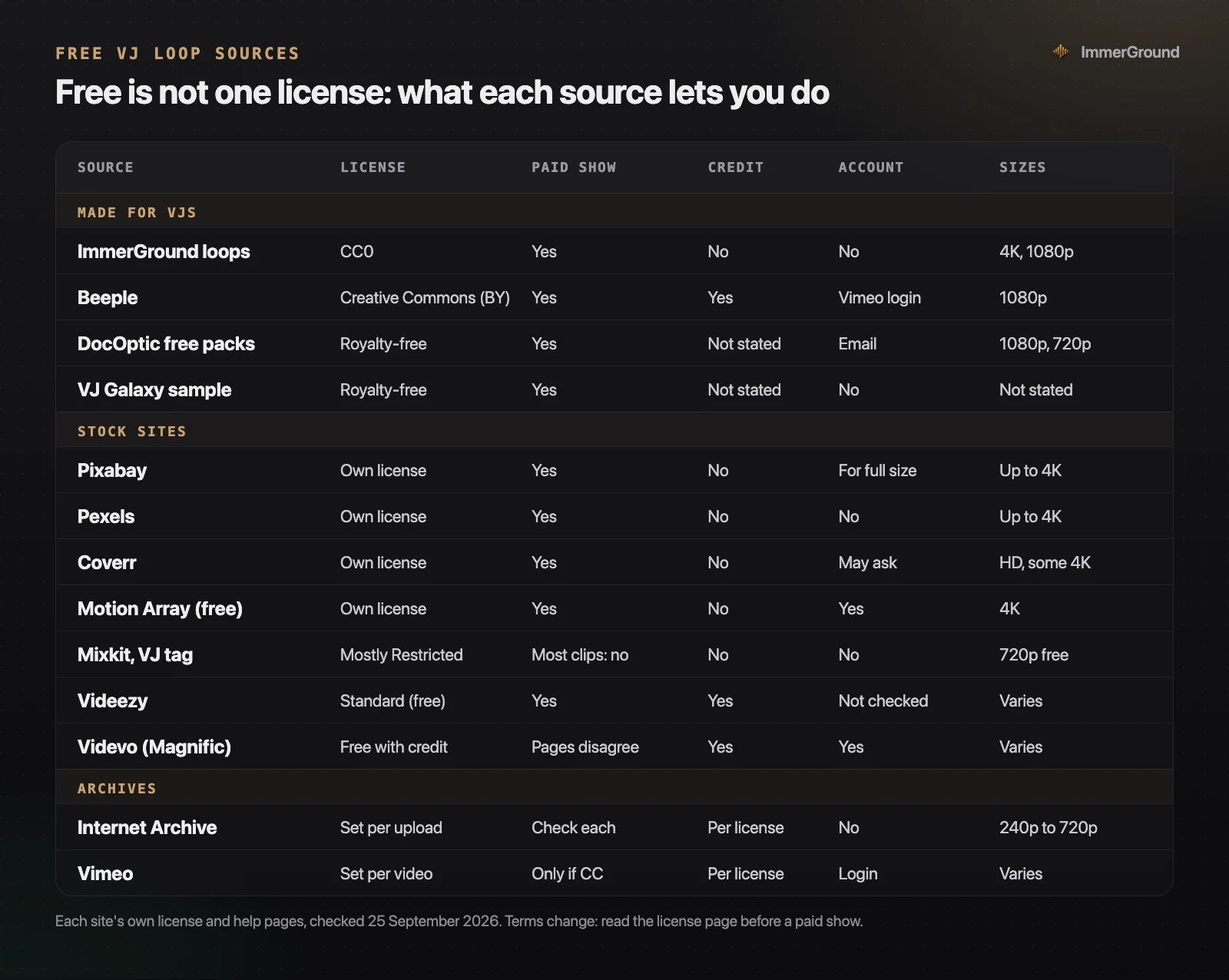
We read the license and help pages of every source in the chart on 25 September 2026. Four things stand out:
- The sources made for VJs are small. Artist packs and free samples from loop stores are cut as loops and often come in the codecs VJ software prefers, but they add up to dozens or hundreds of clips, not thousands.
- The stock sites are huge and mostly not loops. A search for "vj loop" returns thousands of clips on Pixabay and Pexels, because anyone can tag a clip that way. Most are background shots with a start and an end.
- Three sources want a credit. Beeple, Videezy's free clips and Videvo's free clips all ask you to credit the creator or the site. On a club screen that usually means a line in the set description or on the flyer.
- Two sources contradict themselves. Mixkit and Videvo each say one thing on one page and something stricter on another. When a site's own pages disagree, follow the stricter one.
The big stock sites: huge libraries, few real loops
The big free stock sites have the largest libraries by far, clear licenses and fast downloads. What they mostly do not have is loops: clips cut to repeat without a visible jump, at a length that fits a bar count. Here is what each one allows, from its own license page.
- Pixabay. Free for commercial use with no credit under the Pixabay Content License. You may not sell or hand out unaltered copies, NFTs included, and you may not use clips that show brands for commercial purposes. You need a free account for the full resolution, which is usually 3840 by 2160 where a clip has it. A "vj loop" search lists more than 4,800 clips.
- Pexels. Free for commercial use with no credit, and no account needed. You may not sell unaltered copies or repost clips to stock or wallpaper sites, and clips come in SD, HD and UHD. A "vj loop" search lists about 4,300 clips.
- Coverr. Free for commercial use with no credit, but it no longer uses CC0, which is how it started. Its own license now rules out reselling clips through stock sites or building a competing service, and it gives you no model releases for people in the shots. Some clips come from Shutterstock, its Looped category includes AI clips, and its own blog says you may be asked to sign in with a free Google account to download.
- Motion Array. Free items are free for commercial use with no credit, with a free account. Its VJ Loops category had nine free items when we looked, and the one we opened was 4K. One catch worth knowing: if you close the free account, you can no longer use its assets in new work, although videos you already published stay covered.
- Videezy. Free and paid clips sit in the same results. The free Standard license allows commercial use but requires a credit; the paid Pro license drops the credit.
- Videvo. The old videvo.net address now forwards to Freepik's video library, and Freepik is now called Magnific. Free items need a credit ("Designed by Magnific"), a free account allows ten downloads a day, and the site's pages disagree on whether free items can be used commercially: the license page says yes with a credit, the plans page says the free plan is for personal use. Until that is resolved, keep these clips out of paid shows.
Where "just search the stock sites" breaks
The usual advice is to type "VJ loop" into a free stock site and download the top results. Two problems. The first is the seam: a clip tagged as a loop is often a trimmed shot, and a jump every twelve seconds looks like a fault on a big screen. The second is the license on the page that looks most like a VJ page. Mixkit's VJ Loops tag says its clips are under the Free License, but when we opened them, 52 of its 62 clips were free only as a 720p download under Mixkit's Restricted license, which covers personal projects only: no ads, no company social posts, no YouTube, no broadcast. The commercial 1080p and 4K versions go through Envato, its paid sister site. A clip from the most VJ-looking corner of a free site may not be allowed at a paid gig.
The stock sites are still worth using, with a different search. Search for what you want to see, such as "abstract tunnel", "particles black background", "ink in water" or "neon lines", then check each result for a seam and a length that fits the beat. A plain background shot also makes good raw material under effects that follow the music, where a jump at the loop point hides inside a cut.
Artist packs and community archives
The oldest free VJ clips come from artists who released their own packs, and from archives where VJs share work. These are real loops, made for sets, but their terms vary more than any stock site's.
- Beeple. Mike Winkelmann's VJ packs are released under a Creative Commons license for commercial and non-commercial use, and the rights to any audio stay with their owners. His page does not name a version; the Vimeo uploads we checked show CC BY 3.0, so credit him. The packs are HD (Manifest, for example, is 65 clips and 2 GB), the files on Vimeo are 1080p, and downloading from Vimeo needs a login. They are also well known, which is a reason to put them under your own effects.
- DocOptic. A loop store with free packs through a $0 checkout; the download link arrives by email. The packs are 1080p and 720p in PhotoJPEG, DXV 3, HAP and H.264, and are sold as loops. They are royalty-free, with no resale even if you change them, and the FAQ does not mention a credit. DXV and HAP are made for desktop VJ software such as Resolume; take the H.264 files for an iPad or a phone.
- VJ Galaxy. A free sample pack, royalty-free for commercial use, with no email asked. H.264 at 30 frames a second, sold as loops; the page does not state the resolution.
- The Internet Archive. Its "VJ Loops & Performances" collection had 592 items when we counted: 371 under NonCommercial Creative Commons licenses, 88 in the public domain or CC0, 63 under other Creative Commons licenses and 70 with no license at all. The Archive does not guarantee any of it; each uploader sets the terms, and you use items at your own risk. Files run from 320 by 240 PhotoJPEG to 720p MP4, which is fine as texture under effects and soft as a full-screen picture on a big LED wall. One pack we checked lists CC BY-NC-ND 3.0 in its details and a BSD-style license in its description; when two labels disagree, follow the stricter.
- Vimeo. Creators keep the copyright, and a video is under Creative Commons only if its creator chose a CC license for it. Vimeo itself warns that a CC label can be invalid if the uploader did not have the rights in the first place. Downloading needs a login, and the owner has to have switched downloads on.
Paid packs, and "free" that is not
For comparison, the packs that loop stores sell often come with licenses written for live shows. Resolume's footage store, for example, has no free packs; a pack like Heads runs from €39 at 640 by 480 to €99 at 4K, and its license allows two computers, no resale, no TV or film, and does not let you record or stream the footage on its own, although you can record your performance. If you post your sets online, that difference matters, and it is one CC0 does not have. Some stores also say "free" and mean something else: VJ Loops Farm lists free loops that go to paying customers on request, under a license that is for personal use unless they approve otherwise in writing.
Ours: CC0 loops cut for a beat grid
We make ImmerGround, and our free VJ loops are the packs we wanted when we started: made for a set, not for a stock library.
- CC0. Free for any use, commercial included, no credit needed, no email and no account.
- Cut to the beat. Every loop is 32 beats at 120 BPM, 16 seconds, with no visible join. In Resolume, set the clip's beat count to 32 and it stays in time with the set.
- Two sizes. 4K and 1080p, H.264 MP4 at 30 frames a second, silent.
- Three packs, 25 loops. Thermal (inferno, iron, plasma, night vision and more), ASCII and glitch (character grids, RGB split, slices, pixel bursts and Currency sky), and dither and halftone (ordered dither waves, halftone ink, contour maps, braille terrain).

The honest limits: 25 loops is a small library next to the stock sites, every loop is abstract (no people, no places), and they are all at 120 BPM, so at other tempos you speed the clip to the set or let the beat count do it. The loops are made with ImmerGround's own effects over scenes generated in code, so they share a look; that is good for a coherent set and less good if you want variety from one source. If you want the night vision look on your own footage rather than on a loop, our night vision effect guide covers the free ways to get it.
Five checks before a loop goes on the projector
A minute per clip at home saves a black screen, a stutter or an awkward email later.
- The license, for this use. Find the license page, not the download page, and check three things: commercial use, credit, and any list of forbidden uses. Save a copy of the page with the files, so you can show it if anyone asks.
- The seam. Play the loop on repeat and watch the join. A clip that jumps at the loop point looks like a fault on a big screen. Stock clips are often trimmed shots, not loops; the seam is where you find out.
- The tempo. Count the beats in the loop. A clip cut to a round number of bars at a known tempo can be locked to the set; a clip of arbitrary length will drift against the music unless you retime it.
- The resolution and the file. Check the real resolution, not the thumbnail, and play it at full screen on the machine you will use. A 4K H.264 file can stutter on an older laptop; a 1080p version of the same loop is often the safer choice for a club screen.
- What is in the picture. Logos, brand names, recognisable people and famous buildings can carry rights of their own that a free stock license does not clear. For a club screen, abstract loops avoid the question.
Make free loops look like yours
The problem with free loops is that everyone else has them too. The fix is to treat a loop as raw material, not as the finished picture.
- Run them through effects that follow your music. Load a loop as the clip in ImmerGround's video engine and map the bass to a zoom, the beat to a freeze or a flash, and the highs to an RGB split. The same loop looks different under every track, because the track drives it.
- Change the palette. A thermal look, a colour shift or monochrome turns a stock clip into part of your set's colour story; our guide to the thermal camera effect covers which palette suits which footage.
- Cut between loops on the drop. A bank of looks on MIDI pads, fired on the downbeat, makes four free loops feel like an edit.
- Mix in your own footage. One clip of your own crowd, your city or your artwork between the loops tells people whose night it is.
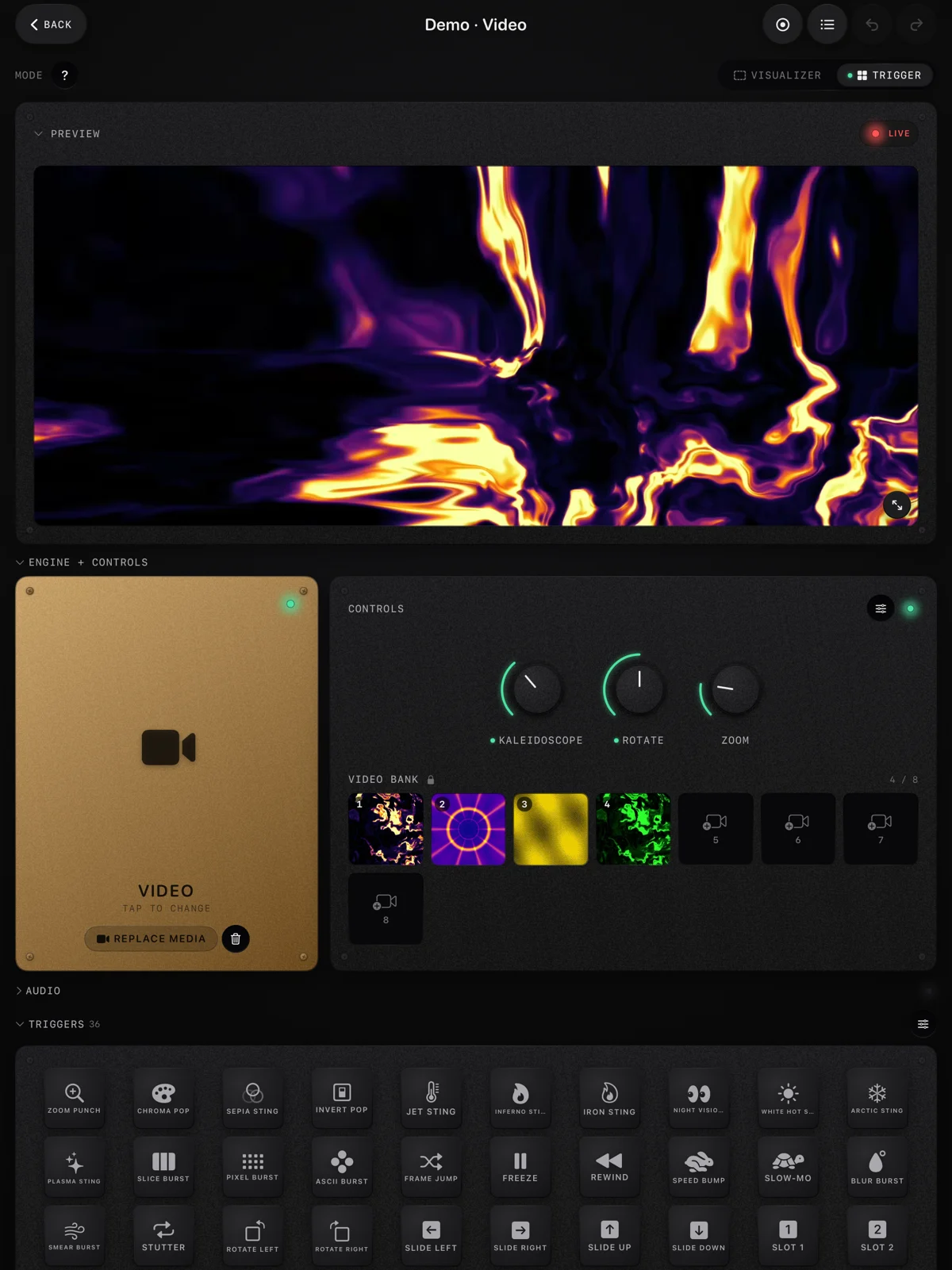
You can try the effect side free in a browser first: our live audio visualizer takes a loop as Your file and runs the same effects on it with your mic or a song as the source.
Organise a library you can play from
A folder of three hundred downloads is not a library. A library is something you can reach for in the middle of a set.
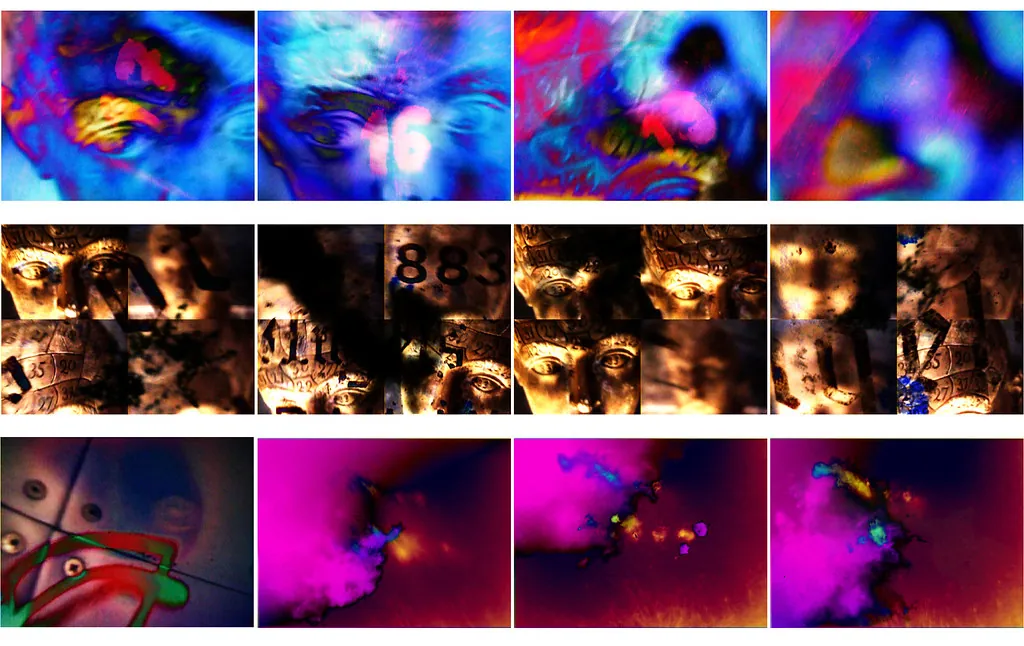
- Sort by energy, not by source. Folders for warm-up, build, peak and closing beat folders named after the site you got them from.
- Keep the license with the files. A text file in each folder with the source, the license name and the link. You will not remember in a year.
- Make a playable set per night. Twenty to forty clips you know, not the whole archive. In ImmerGround that is a project with a video bank and pad scenes; in Resolume it is a deck.
- Keep 1080p copies for the road. 4K masters at home, 1080p on the laptop or the iPad you take to the gig.
If you are building a set around a DJ, our guide to visuals for a DJ set turns this library into a plan for the night.
Where to get it
- ImmerGround free VJ loops. Three packs, 25 loops, CC0, in 4K and 1080p, each 32 beats at 120 BPM. No account and no email.
- Pexels and Pixabay. The biggest free libraries, free for commercial use without a credit. Search for what you want to see, not for "VJ loop", and check every clip for a seam.
- Beeple's VJ clips. Real loops under Creative Commons; credit him.
- The Internet Archive's VJ collection. Filter for public domain and CC0 first, and skip anything NonCommercial for a paid show.
- ImmerGround. iPhone, iPad and Mac. Load a loop into the video engine and let the music drive effects on it, with MIDI pads for the drops. Free to download; ImmerGround Pro is $6.99 a week or $39.99 a year.
- Free live audio visualizer. In your browser: load a loop as Your file and try the same effects with your mic or a song, and record up to 60 seconds, with a small immer ground mark in the corner.
What to do next
- Pick three sources from the table above whose licenses fit the gigs you play.
- Download twenty clips and run the five checks on each: license, seam, tempo, file, content.
- Save the license pages next to the files.
- Sort what survives by energy into warm-up, build, peak and closing.
- Put them under effects that follow the music, in ImmerGround or in the browser visualizer, so the loops stop looking like everyone else's.
- Add one clip of your own to every part of the night.
.jpg)