The Music app on iPhone has no visualizer: you get lyrics and animated album art, and the classic Visualizer stayed on the Mac. So a music visualizer on iPhone means an app, and there are dozens on the App Store. They split into three jobs that rarely overlap: something beautiful to watch while music plays, a video of your song to post, or visuals you perform at a party or a gig. This guide checks ten of them against their App Store listings on 13 November 2026, with the real prices behind the "Free" button, how each one hears the music, and the catch that decides most of the choice before looks do.
How this list was checked, and our bias
Every price and feature below comes from each app's own US App Store listing and its in-app purchase list, read on 13 November 2026. We did not count stars or rank by downloads, because a visualizer with thousands of ratings from 2019 tells you little about the app today; instead each entry notes when it was last updated. Where an app's listing says something we could not confirm, we quote the listing rather than guess.
We make ImmerGround, one of the apps on the list. It sits in the group where it fits, not at the top, and its section says plainly what it does not do. If you want a list without a horse in the race, the comparison table is built the same way for every app, so you can check our work.
A word on "Free". Nearly every app here downloads for free and sells something inside: a one-time purchase, a subscription, or both, sometimes with several tiers. The table gives the range you will actually meet, so you can compare like with like.
Ten music visualizer apps for iPhone at a glance
| App | Price (US, 13 Nov 2026) | How it hears the music | Best for |
|---|---|---|---|
| Trance 5D | Free; Premium $1.99 | Its own player for your music library, plus internet radio | Watching, at home or at a party |
| Music Visualizer: Spectrum FX | Free; Pro from $4.99, yearly $29.99 | Song files | Quick spectrum videos and shared presets |
| Vibely | Free; $0.99 a week, $5.99 a month or $24.99 a year, lifetime options | Song files, or audio pulled from a video | Videos for TikTok, Reels, Shorts and Spotify Canvas |
| Spectra | $1.99 | Song files and iTunes purchases | A simple spectrum video with your logo |
| STAELLA | Free; Premium $4.99 or $49.99, visual packs $9.99 | Files, microphone, or an AUv3 plugin's audio | Both: polished videos and live sets |
| Vythm | Free; Pro and unlocks from $4.99 | Files, iTunes library, microphone | Live visuals with MIDI and NDI |
| Chromatose | Free; Pro $5.99 or $49.99 | Microphone or an audio interface | A visual synth you play |
| AV Synth | Free; $6.99 a week, $39.99 a year, $59.99 lifetime | Live audio | Layered generative visuals |
| Planetary Remastered | Free | Your Apple Music library, browsed as a 3D universe | Exploring your collection, not reacting to it |
| ImmerGround | Free; Pro $6.99 a week or $39.99 a year | Microphone, song files, MIDI controllers | Your own footage or 40 shaders, moved by the music |
Three of these are made by the same developer, Marvin Krueger: Spectrum FX, Vythm and AV Synth. They do different jobs, so they appear in different sections below.
The catch: most visualizers cannot hear Spotify or Apple Music
This is the part most lists skip, and it decides more than the graphics do. Streaming services protect their audio, and iOS does not let one app read the sound another app is playing. The listings say so in their own words. STAELLA's notes that DRM-protected tracks, Apple Music included, cannot be played. Vythm's says Apple Music is not currently supported, and Spectra's describes its iTunes support as "not Apple Music". Spotify does not hand its audio to other apps either; we cover what that means in our guide to a Spotify visualizer on iPhone and iPad.
That leaves three ways for a visualizer to hear the music, and every app above uses one or more of them.
- Song files you own. MP3, WAV, AAC or M4A from the Files app, AirDrop or a download. The cleanest signal, and the only one that gives the same result on every play, which is why video makers use it.
- The microphone. Play the music out loud from any app or any speaker, and the visualizer listens. It works with Spotify, Apple Music, a turntable or a live band. The price is that the room is in the signal too: voices, clinking glasses, the bass of the speaker itself.
- A built-in player or radio. Some apps ship their own: Trance 5D plays your library and streams internet radio stations, and STAELLA can visualize the audio of an AUv3 plugin running inside it.
So before you look at a single screenshot, decide where the music will come from. If it is Spotify or Apple Music and you want visuals on the same phone, only the microphone route works, and the app needs good microphone handling: automatic gain, a noise gate, and some smoothing on the bass.
If you just want something beautiful to watch
This is the screensaver job: music on, phone or TV showing shapes that move with it, nobody touching anything. The apps here are the easiest to start with, and the cheapest.
Trance 5D Music Visualizer
Trance 5D offers seven 3D visualizers, with names like Alien Lights, Singularity, Shapeshifter and Space Lotus Journey, that move with the sound in real time. It plays your own music through a built-in player and streams internet radio in house, techno, trance, ambient, rock and pop, which neatly solves the "what does it listen to" problem for a party. It supports AirPlay, so the picture can go to a TV. The free version runs the visualizers; the $1.99 Premium adds customisation of colours, backgrounds and movement, video recording and NDI streaming. It was updated in November 2026, which matters in a category full of abandoned apps.
Planetary Remastered
Planetary is the odd one out, and worth knowing about because people find it when they search for an Apple Music visualizer. It turns your Apple Music collection into a 3D universe: artists become stars, albums become planets, and you play music by flying to them. It is beautiful and free, but it visualizes your library, not the sound, so do not expect the picture to hit on the kick. It needs an Apple Music subscription or an iTunes library.
If what you want is a bigger screen rather than a different app, our guide to the Apple Music visualizer on iPhone, iPad and Mac covers the built-in Visualizer on the Mac and how to get visuals on the other two.
If you want a video of your song to post
The second job is a file: your track with visuals that move to it, exported for TikTok, Reels, Shorts or YouTube. Here the input is always a song file, and the questions are templates, export resolution and aspect ratio.
Vibely
Vibely is the most complete video maker on the list, and the most up to date: it was updated on 12 November 2026 and requires iOS 26. You import any track, start from one of 48 templates or from scratch, and stack layers: 14 reactive visualizers (spectrum, waveform, particles, plasma, vortex, nebula, synthwave sun, fire and more), text, images, video and progress bars, with 39 beat-reactive effects such as glow, ripples, kaleidoscope, VHS and glitch. It exports in SD, HD, QHD or 4K at up to 60 frames a second, in the shapes each platform wants, and its listing mentions Spotify Canvas loops made from album art. The editor is the same on iPhone, iPad and Mac. Pricing comes in several tiers: $0.99 a week, $5.99 a month, $24.99 a year, and lifetime options at $8.99 and $44.99.
Music Visualizer: Spectrum FX
Spectrum FX loads songs from your files, lets you arrange visuals over them and plays the show. Its Pro tier adds recording, saved presets and a choice of canvas aspect ratio, and the app has a community where users share and rate presets, which is a quick way to find a look you like. Pro is sold in several forms, from $4.99 to a $29.99 yearly plan, with an all-features option at $49.99.
Spectra
Spectra is the simplest and the only paid-up-front app here, at $1.99. It draws a spectrum visualizer for an audio file or an iTunes song, lets you set a background image and a logo in the middle, and exports video at up to 4K and 60 frames a second. Its last update was in November 2024, so it does one thing and does not change much; that suits a producer who wants a clean spectrum clip and nothing else.
For the full workflow, from picking the look to YouTube's upload settings and Content ID, see our guide on how to make a music visualizer for YouTube. If you would rather not install anything, our free browser visualizer records up to 60 seconds in 16:9, 9:16 or 1:1 straight from a web page.
If you want to play visuals live, at a party or a gig
The third job is a performance: a TV or projector behind the music, and you changing the picture as the night moves. Here the questions are the microphone, a second screen, and whether a MIDI controller can drive it.
STAELLA
STAELLA straddles both jobs better than anything else here. You combine 30 visuals and 78 shapes with knobs, text, backgrounds and ten screen effects, and visuals and shapes switch on the beat. It hears files, the microphone, or the audio of an AUv3 plugin, and it can show time-synced lyrics for songs in its lyric database. For live use it sends the picture full screen to a TV or projector over AirPlay or an HDMI adapter while the controls stay on the phone, and it takes MIDI controllers (long-press any knob to assign), Bluetooth MIDI and gamepads. For video, it records your performance or renders a hands-off export at up to 4K with HDR, and can record a whole playlist. Premium is $4.99 or $49.99 depending on the tier, and themed visual packs cost $9.99 each.
Vythm
Vythm, sold as Music Visualizer DJ, has modes from Equalizer, Rhythm and Peer, which are free, to Mandala, Shapes, Fluids, Psychedelic and Dreaming, which need a purchase. It takes mp3 and m4a files, your iTunes library (not Apple Music) and the microphone with adjustable sensitivity. For live work it reads MIDI input and streams over NDI to another computer, and it records your sessions. Its in-app list is long, from single modes at $4.99 to "all features" bundles and a $139.99 option that includes future updates.
Chromatose
Chromatose is a visual synthesizer rather than a visualizer: you build looks from four generators and chains of effects, then play them, and they react to live audio from the microphone or an audio interface, with auto-gain. Its live features are serious: eight hot-swappable patches per set, MIDI over USB, Bluetooth and network with clock sync, and output over HDMI or AirPlay. The free plan includes every generator and effect, with 1080p output, two saved patches and 30-second recordings; Pro ($5.99 or $49.99) lifts those limits to 4K, unlimited patches and ProRes recording.
AV Synth
AV Synth, from Vythm's developer, layers up to five generated visuals, each with its own chain of effects, automates their parameters from the music, and saves looks as presets to recall live. Its Pro tier adds high-quality recording and NDI streaming, at $6.99 a week, $39.99 a year or $59.99 for life.
The iPad versions of these apps, and five more aimed at VJs, are compared in our roundup of the best VJ apps for iPad.
ImmerGround: your footage, or 40 shaders, moved by the music
ImmerGround is our app, so weigh this section accordingly. It works two ways. In a video or photo project, it puts effects on your own clip or picture and lets the music move them: the bass pushes a kaleidoscope, the kick fires a strobe or a freeze, the highs split the colour. In a shader project, it plays one of 40 generative scenes, such as Wobble Grid, Op Art, Kanji, Pixel Sort and Cymatics, each with four knobs of its own and two music mappings already in place, so it moves from the first beat. Four shaders are free; the other 36 come with Pro.
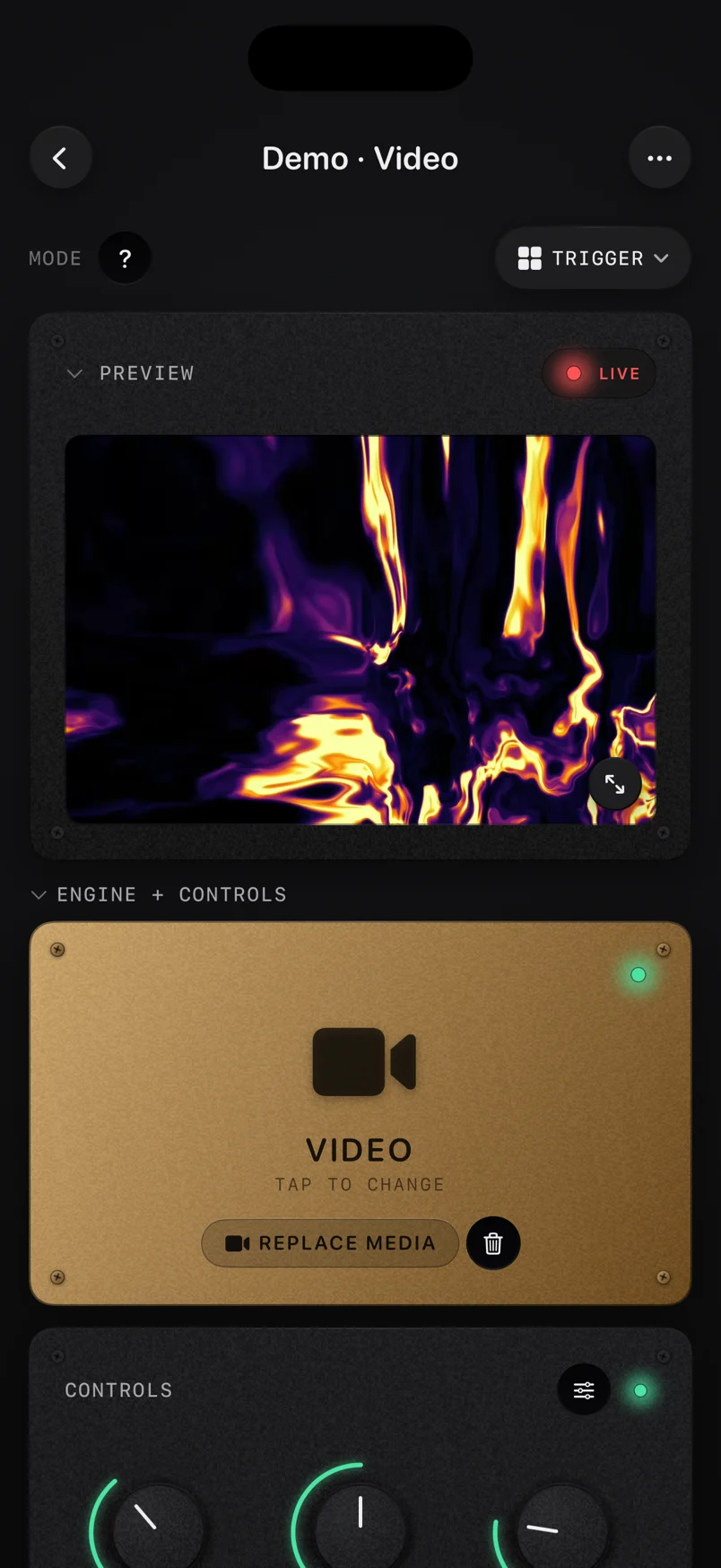
It hears the microphone, with automatic gain and a noise gate for loud rooms, or a song file (MP3, WAV, AAC or M4A). A class-compliant MIDI controller over USB-C or Bluetooth maps the same way as the sound, on one readable list of mappings with a curve, a range and smoothing per row. Pad scenes recall a whole look on one hit, the picture goes to a second screen over HDMI or AirPlay, and every session is recorded and can be rendered again later at up to 4K. It is one app for iPhone, iPad and Mac, free to download, with ImmerGround Pro at $6.99 a week or $39.99 a year.
What it does not do, so you can rule it out fast. It has no templates or text layers for a finished social video, which is Vibely's strength. It does not send video over NDI. It cannot read Spotify or Apple Music directly; like every app here, it hears them through the microphone. And its shaders are scenes you play, not ones you build.
Five things to check before you pay
The App Store page shows one price, but the in-app list underneath is where the real cost lives. These five checks take a minute each and save most of the regret.
- One-time or subscription. Spectra and Trance 5D cost $1.99 once. Vibely, AV Synth and ImmerGround sell weekly or yearly plans, and several apps sell both a subscription and a lifetime purchase. If you will use it for one video, a week is cheaper than a lifetime; for a weekly gig, the yearly or lifetime price wins.
- What the free tier really allows. Chromatose spells it out: every generator and effect, 1080p output, two saved patches and 30-second recordings. Vythm keeps three modes free. Read the listing for the same detail before you assume.
- Export size and shape. For posting, you want 9:16 for TikTok and Reels and 16:9 for YouTube, at 1080p or more. Vibely exports up to 4K at 60 frames a second, STAELLA up to 4K with HDR, Spectra up to 4K at 60.
- When it was last updated. A visualizer that has not been updated in years may still run, but it will not get fixes for new iPhones or new versions of iOS. Most apps here were updated in October or November 2026; Spectra's last update was November 2024.
- Whether it follows you to iPad and Mac. A bigger screen helps for editing and for live sets. Vibely and ImmerGround describe the same app on iPhone, iPad and Mac.
Where the usual advice breaks: looks matter less than the input
Most "best visualizer app" lists rank by how pretty the screenshots are. That is the wrong first question, because every app on this list has a mode that looks good in a screenshot. What decides whether you keep it is how it hears the music, and that splits the list cleanly.
If you make videos of your own songs, the input is a file and almost any of these will hear it perfectly; choose on templates, export sizes and price. If you want visuals with Spotify or Apple Music, the input is a microphone in a room, and the app that handles a noisy signal well will look better on the night than the app with the best screenshots. Test it the way you will use it: speaker on, people talking, a song with a long quiet intro. A visualizer that jumps at every voice and sleeps through the breakdown will not save itself with prettier shapes.
The other overlooked question is the second screen. A phone screen is small, and most of the fun of a visualizer is on a TV or a projector. Check that the app sends a clean, full-screen picture over AirPlay or HDMI, not a mirrored copy of the whole interface. STAELLA, Chromatose and ImmerGround describe a full-screen output with the controls kept on the device; Trance 5D lists AirPlay support.
Three setups that work
| The job | Music from | Apps to try | What to set first |
|---|---|---|---|
| A party at home | Spotify or Apple Music on a speaker | Trance 5D with its radio, or any mic-based app | Put the phone near the speaker, AirPlay to the TV, lower the sensitivity |
| A video of your track | Your own song file | Vibely, Spectrum FX, Spectra or STAELLA | Aspect ratio first (9:16 for Reels and TikTok), then the look |
| Visuals at a gig | The PA, heard by the microphone | STAELLA, Chromatose, Vythm or ImmerGround | A MIDI controller for the big changes, HDMI to the projector |
For the gig setup, the cable and the room matter as much as the app. Our guide to a live visuals setup with an iPad and a projector covers the adapter, mirroring versus a second screen, and where to put the microphone.
Where to get it
- Free live audio visualizer. Runs in your browser: your mic or a song in, ImmerGround's effects on a clip, a photo or your camera, and recordings up to 60 seconds. Free, nothing uploaded, nothing to install.
- ImmerGround. iPhone, iPad and Mac, one app. Free to download; ImmerGround Pro is $6.99 a week or $39.99 a year.
- Free VJ loops. 4K and 1080p loops at 120 BPM, CC0, no email: footage to put under any visualizer that takes your own video.
- The other apps on the list are linked in their sections above, each to its App Store page.
What to do next
- Name the job: watching, a video to post, or a live set. The three groups above barely overlap.
- Decide where the music comes from. A song file opens every app; Spotify and Apple Music mean the microphone.
- Try the free tier with your own music, in the room where you will use it, before you pay for anything.
- Check the second screen if the visuals are for a TV or a projector: a clean full-screen output, not a mirrored interface.
- If you want to test the idea first, open the browser visualizer: it shows in a minute whether the microphone route works in your room.