The Camelot wheel is the reason DJs can talk about keys without knowing music theory. It turns the 24 musical keys into codes from 1A to 12B arranged like a clock, so that choosing the next track in key becomes simple arithmetic: stay on the same number, move one hour, or switch rings. This guide covers what the wheel actually is and why it works, every key in the three notations DJ software uses, the moves that are safe and the ones that change the energy on purpose, how rekordbox, Serato, Traktor and VirtualDJ show keys, the pitch trap that quietly moves a track to a different key, and where following the wheel strictly makes a mix worse.
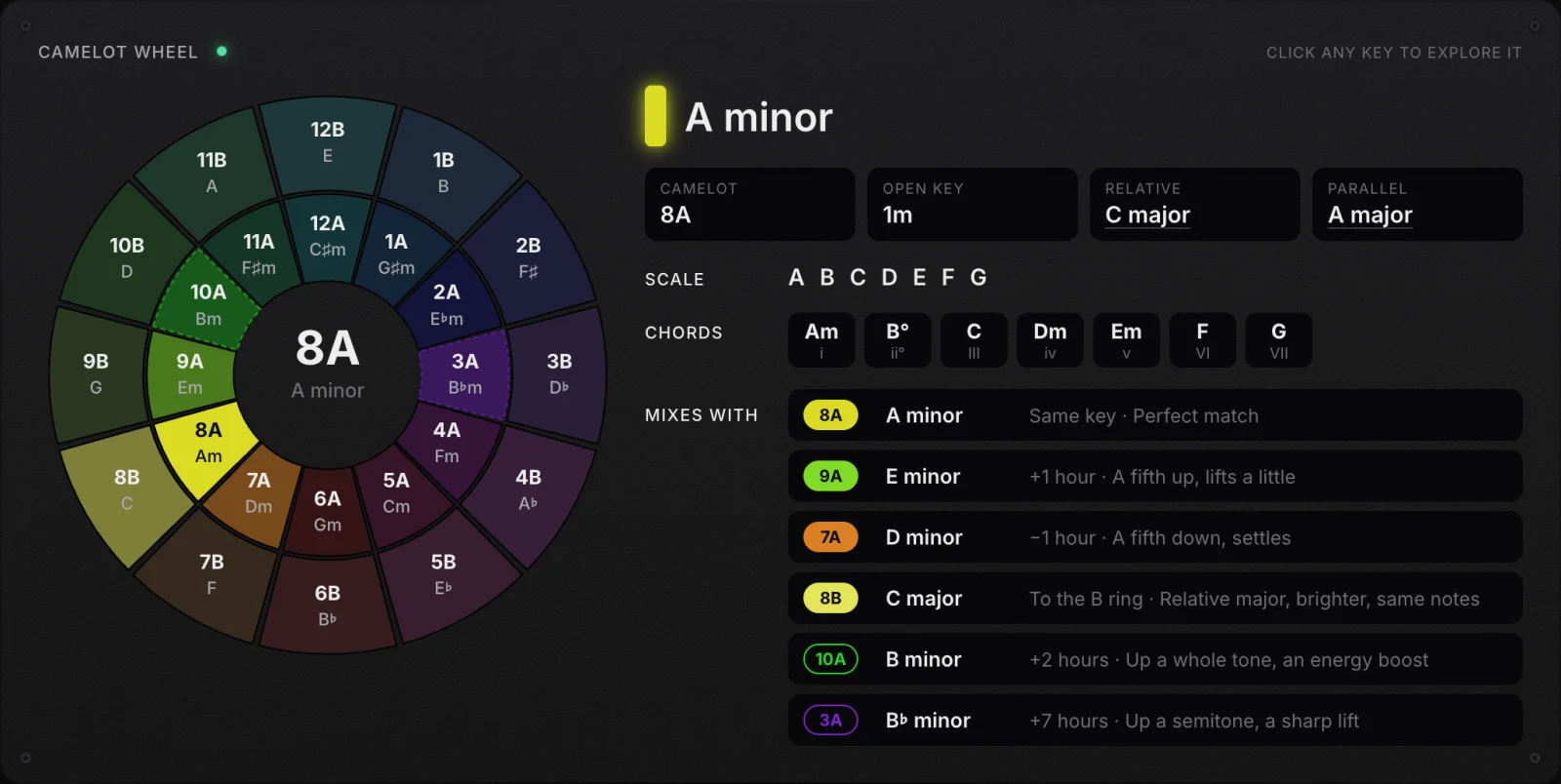
The wheel is the circle of fifths with numbers on it
Musicians have arranged keys in a circle for centuries. Walk clockwise around the circle of fifths and each step is a fifth higher: C, G, D, A and so on until you come back to C after twelve steps. Neighbours on that circle share six of their seven notes, which is why songs in neighbouring keys sound related. The Camelot wheel is that same circle with two changes that make it usable in a dark booth.
- Numbers instead of note names. Each position gets an hour from 1 to 12. C major sits at 8, G major at 9, D major at 10. You never need to know that D is a fifth above G; you only need to know that 10 comes after 9.
- Two rings. Major keys sit on the outer ring and get the letter B. Each one's relative minor, the minor key with exactly the same notes, sits on the inner ring at the same hour with the letter A. So 8B is C major and 8A is A minor.
The system was created by Mark Davis and popularised by Mixed In Key, whose software prints keys in these codes. Some programs use the same idea under another name: rekordbox calls it Alphanumeric, and the free DJ program Mixxx calls its version Lancelot.
Every key on the wheel, in three notations
Here is the full chart: each hour with its minor key (A), its major key (B), and the Open Key code that Traktor and Serato can show instead. Open Key is the same wheel shifted so that C major is 1d and A minor is 1m, with d for major and m for minor. The musical names use the spellings most DJ software shows.
| Hour | Minor (A) | Open Key | Major (B) | Open Key |
|---|---|---|---|---|
| 1 | 1A A♭ minor (G♯ minor) | 6m | 1B B major | 6d |
| 2 | 2A E♭ minor (D♯ minor) | 7m | 2B F♯ major | 7d |
| 3 | 3A B♭ minor | 8m | 3B D♭ major | 8d |
| 4 | 4A F minor | 9m | 4B A♭ major | 9d |
| 5 | 5A C minor | 10m | 5B E♭ major | 10d |
| 6 | 6A G minor | 11m | 6B B♭ major | 11d |
| 7 | 7A D minor | 12m | 7B F major | 12d |
| 8 | 8A A minor | 1m | 8B C major | 1d |
| 9 | 9A E minor | 2m | 9B G major | 2d |
| 10 | 10A B minor | 3m | 10B D major | 3d |
| 11 | 11A F♯ minor | 4m | 11B A major | 4d |
| 12 | 12A C♯ minor (D♭ minor) | 5m | 12B E major | 5d |
To convert by hand, add five to the Camelot number and subtract twelve if the result is above 12; then A becomes m and B becomes d. Camelot 8A is 8 plus 5, which is 13, minus 12: Open Key 1m. Camelot 1B is 6d. Going the other way, subtract five and add twelve if the result is below 1.
Six safe moves, and two that change the mood
From any key, the wheel gives you a short list of next keys that will not clash. The names below are the ones in Mixed In Key's own harmonic mixing chart; the logic behind them is plain music theory, and the examples start from 8A, A minor.
| Move | From 8A to | In music terms | How it feels |
|---|---|---|---|
| Perfect mix | 8A | The same key | Nothing changes but the track |
| +1 | 9A (E minor) | A fifth up | A small lift, the most common move |
| −1 | 7A (D minor) | A fifth down | Settles, slightly darker |
| Scale change | 8B (C major) | The relative key, same notes | Same colours, brighter from minor to major |
| Energy boost (+2) | 10A (B minor) | A whole tone up | A clear step up, used at a peak |
| Diagonal | 7B (F major) | One note different | Works in a blend, riskier over a long overlap |
| +7, the semitone lift | 3A (B♭ minor) | A semitone up | A dramatic lift; mix fast, not in a long blend |
| Mood shifter | 11B (A major) | The parallel key: same home note, other scale | The same root with a completely different mood |
The first four are the ones people mean by harmonic mixing, and they are genuinely safe: the keys share six or seven notes, so basslines and chords rarely fight. The last four are deliberate changes. The semitone and whole tone lifts are the DJ's version of the key change before a pop song's last chorus. They work because the ear hears the new key as higher and brighter, and they work best when the two tracks overlap only briefly.

Why neighbours mix: they share six of seven notes
A major or minor key uses seven of the twelve notes. The trick of the circle of fifths is that each step around it swaps exactly one of those seven. C major is the white keys; G major, one step clockwise, is the white keys with F sharp instead of F. So when a track in 8B blends into a track in 9B, six of the seven notes in play are the same, and the one that differs is usually a passing note rather than the root of the bassline.
The relative move shares all seven notes and changes only which note feels like home, so it is the safest move of all in terms of clashes, and the most noticeable in terms of mood. Two hours away shares five notes; by three hours away the keys share only four, and a long blend starts to sound muddy. The wheel's rule of thumb, stay within one hour or switch rings, is a way of keeping the overlap at six or seven shared notes without counting.
The Camelot wheel against the circle of fifths
People often ask whether they should learn the wheel or the circle of fifths. They are the same map drawn two ways, and the differences are all about labels.
| Circle of fifths | Camelot wheel | |
|---|---|---|
| At the top | C major, with A minor inside it | 12B E major, with 12A C♯ minor inside it |
| One step clockwise | A fifth up | A fifth up, and one hour later |
| How keys are named | Note names, with the sharps or flats in the key signature | A number from 1 to 12 and a letter, A for minor, B for major |
| What you need to know | Note names and which keys are relative | Only that the neighbours of 8 are 7 and 9 |
| Best for | Writing, arranging and reading music | Choosing the next track quickly |
If you play an instrument, the circle of fifths tells you more, because it keeps the note names and the key signatures in view. If you only need to choose a compatible track in the middle of a set, the wheel is faster, because the arithmetic replaces the theory. Knowing both costs nothing: C major is 8B, and every step you take on one is the same step on the other.
| Distance on the wheel | Notes in common | In a long blend |
|---|---|---|
| Same code, or the other ring at the same hour | 7 of 7 | Clean |
| One hour, same ring | 6 of 7 | Clean |
| Two hours | 5 of 7 | Usually fine if the basslines are not both loud |
| Three hours or more | 4 or fewer | Clashes; cut quickly instead of blending |
How rekordbox, Serato, Traktor and VirtualDJ show keys
Every major DJ program analyses keys, and each has its own name for the notations. Knowing which setting to pick saves you from translating in your head during a set. This is what each vendor's own documentation says.
| Software | Key notations it can show | Worth knowing |
|---|---|---|
| rekordbox | Classic (Abm, B) or Alphanumeric (1A, 1B) | Set under Preferences, View, Key display format; Pioneer players show the key from the rekordbox library |
| Serato DJ Pro | Camelot, Classical or Open Key | Key analysis is part of Serato DJ Pro, not the free Serato DJ Lite |
| Traktor Pro 4 | Musical, Musical (all sharps) or Open Key | Can write the key into the file's tag in any of those forms |
| VirtualDJ | Musical (C, C♯) or Harmonic (01A, 02A) | Has Key Match and a key difference column |
| Mixxx | Lancelot, Open Key or Traditional | Free and open source; offers two key detectors |
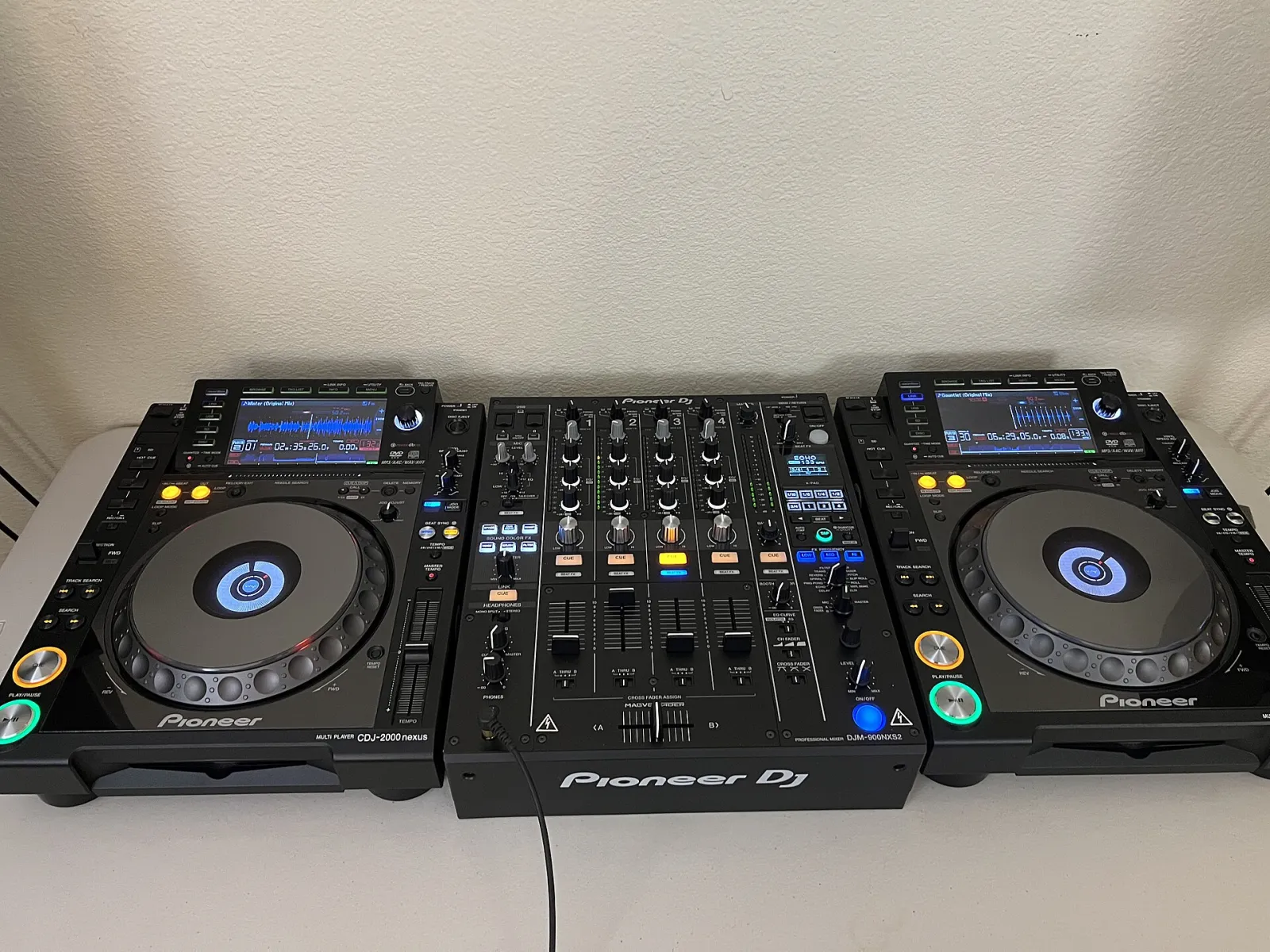
Pick one notation and use it everywhere: in your DJ software, in the file tags, and in any notes you keep. The codes are easier to read at a glance than musical names, and they make the moves above obvious. If you move between programs, Open Key and Camelot convert with the rule in the chart section; the musical names are the same everywhere except for spelling, since A♭ minor and G♯ minor are the same key written two ways.
Keep in mind that the analysis itself can be wrong. Key detectors confuse relative keys and keys a fifth apart, and they disagree with each other on a noticeable share of tracks. Our guide to finding the key of a song covers how often that happens and how to check a key by ear in a minute, and our comparison of Mixed In Key alternatives covers the analysis tools themselves.
Pitch moves the key: a 6 percent change is seven hours
This is the trap that catches DJs who follow the wheel carefully and still clash. When you speed a track up on a turntable or a player without key lock, its pitch rises with the tempo. A change of about 6 percent raises it by a full semitone, and a semitone up is seven hours on the wheel. So an 8A track played 6 percent fast is effectively 3A, and it will clash with the 9A track you carefully picked to follow it.
- Small nudges are safe. A 1 or 2 percent change moves the pitch by a fraction of a semitone. It sounds slightly sharp or flat against the next track but does not change the key.
- Around 3 percent is the worst place to be. The track now sits a quarter tone off, between two keys, where it clashes with both.
- Key lock fixes it. Pioneer calls it Master Tempo; Serato and Traktor call it key lock. With it on, the tempo changes and the key stays. The cost is some audio processing, which on extreme changes can make the track sound slightly smeared.
Key lock has a second, quieter benefit: it keeps a vocal sounding natural when you push the tempo up for a peak. Without it, a 4 percent lift makes every singer sound slightly higher and thinner, which a crowd notices even when it cannot say why.
The trap also works in your favour. If two tracks are one semitone apart and neither is compatible, pitching one of them about 6 percent with key lock off moves it into a compatible key. It is a legitimate trick, as long as the tempo change still suits the set.
Where the rules break: vocals, basslines and wrong keys
The wheel is a guide to what will not clash, not a rule that every transition must follow. Mixing only in key produces sets that are smooth and, over two hours, a little flat. Here is where the common advice goes wrong.
- Drums do not have a key. A transition during a drum intro, a drum break or an outro with no chords can go to any key at all. Much of the time the most exciting key change in a set happens there, and no one hears a clash because there is nothing to clash.
- Vocals are less forgiving than pads. A pad or a chord stab in a neighbouring key blends fine. A sung melody over a track even one hour away can sound wrong, because the voice leans on exactly the note that differs. For an acapella over an instrumental, aim for the same code or the other ring at the same hour.
- Two loud basslines clash in any key. Two basslines fighting for the same low frequencies sound muddy even in the same key. The fix is the mixer's bass EQ, cutting one while the other plays, not the wheel.
- The key on the screen may be wrong. If a mix that should work sounds off, trust your ears and check the key. It is often the relative key or a fifth away from what the software says.
- Songs change key. A track that modulates for its last minute is in a different key when you mix out of it than when you mixed in. A key finder that shows the key section by section tells you which key the outro is in. Our guide to key changes in songs shows what those changes sound like and how to mix around them.
Planning a set with the wheel, without making it boring
The practical use of the wheel is not deciding each transition live; it is preparing crates so that good choices are close at hand. A routine that works:
- Analyse everything once, then spot check. Run your library through your DJ software or a key finder, then listen to the tracks you play most and confirm their keys by ear. Fix the wrong ones in the tag.
- Sort each crate by Camelot code. Tracks at the same hour, and the hours either side, sit next to each other. The next safe choice is always a few rows away.
- Plan the lifts. Decide where in the set you want the energy to rise and keep a few tracks two or seven hours above your main key for those moments.
- Mark the tracks that mix anywhere. Long drum intros and outros are your escape routes. Tag them so you can change key freely when the set needs a turn.
- Break the rule on purpose. A set that stays within two hours of one key for an hour sounds like one long song. A clean cut to a distant key after a breakdown is a feature, not a mistake.
A worked example: eight tracks around 8A
Here is how a short run might look in practice, starting from a track in A minor and building towards a peak. The point is not the exact keys, which depend on your crate, but the pattern: long stretches of safe moves, with one or two planned lifts.
| Track | Key | Move from the last | Why |
|---|---|---|---|
| 1 | 8A A minor | Start | A warm-up track that sets the key |
| 2 | 8A A minor | Same key | A long blend with no risk |
| 3 | 9A E minor | +1 | A small lift as the room fills |
| 4 | 9B G major | To the B ring | Same notes, brighter mood |
| 5 | 10B D major | +1 | Another small lift |
| 6 | 12B E major | +2, energy boost | The planned peak, mixed quickly over a drum intro |
| 7 | 12A C♯ minor | To the A ring | Darker after the peak, same notes |
| 8 | 5A C minor | A cut over a breakdown | A deliberate change of colour where there are no chords to clash |
Six of the seven transitions follow the wheel, and the one that does not happens where the key does not matter. That is a fair picture of how experienced DJs use it: as the default, not as a law.
Where to get it: free tools for keys and the screen
- Song key finder. Free, in your browser. Drop a folder of tracks and get each key with its Camelot and Open Key code as a CSV, see the key section by section, and click any key on the wheel to list what mixes with it. Nothing is uploaded.
- BPM finder. Free, in your browser. The tempo of a track to a hundredth of a BPM, with half and double time, from a file, your mic or tapping; our guide to finding the BPM of a song explains when to trust it.
- Live audio visualizer. Free, in your browser. Visuals that react to whatever you play into the mic, for a screen behind the booth.
- ImmerGround for iPhone, iPad and Mac. Our app, free to download, with ImmerGround Pro at $6.99 a week or $39.99 a year. It listens to the room or a song and moves your own clips and photos with every beat, with MIDI pads for the drops. It reacts to the sound, not the key.
If you are putting a screen behind the booth, our guide to visuals for DJ sets covers the setup, from a phone on a stand to a projector.
What to do next
- Choose one notation and set it everywhere. Camelot, Open Key or musical names, in your DJ software and your tags.
- Check the keys of the twenty tracks you play most. Listen for the home note; fix the ones the analysis got wrong.
- Turn key lock on, or learn the 6 percent rule. Know whether your pitch fader is moving the key.
- Practise the four safe moves until they are automatic. Same code, one hour either way, the other ring.
- Then plan one deliberate lift per set. Two hours up at the peak, or seven for a sharp change, mixed quickly.
_pixabay.jpg)

