Choosing between Resolume and TouchDesigner is the defining decision for desktop VJing and generative visuals on macOS and Windows. This referee guide compares their core architectures, audio reactivity, performance demands, pricing, video codecs, projection mapping, and workflow strengths, helping you pick the right tool for live shows, interactive art, or mobile setups.
Core architectural differences: clip mixing vs generative node networks
When evaluating software for live visual performance, Resolume and TouchDesigner represent two fundamentally different philosophies of visual creation. While both are industry leaders in live event production, they serve different primary workflows and suit different mindsets.
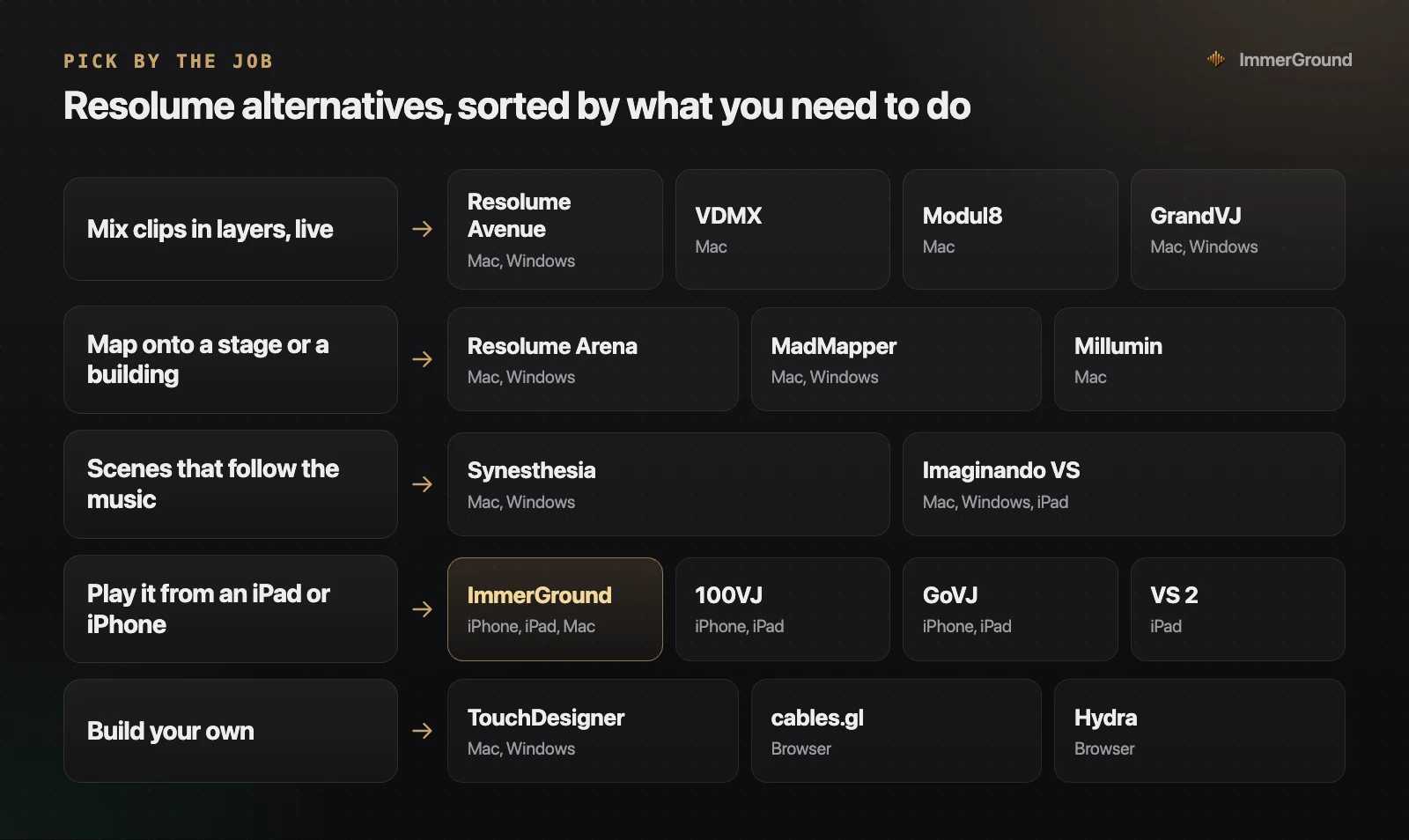
Resolume (available as Resolume Avenue and Resolume Arena) is built specifically for clip-based VJing. Its user interface operates like an instrument for pre-rendered video clips. Clips are organized in a grid of decks and columns, running across multiple video layers. You trigger clips with a mouse click or MIDI pad, blend layers using crossfaders and opacity sliders, and apply real-time video effects. Resolume focuses on immediacy: you can load a folder of video loops, plug in a MIDI controller, and start performing a visual set within minutes.
TouchDesigner, developed by Derivative, is a visual node-based programming environment. Instead of playing back pre-made video loops, TouchDesigner generates 2D graphics, 3D geometry, shaders, and animations in real time using networks of operators wired together. Operators are divided into families: Texture Operators (TOPs) for image processing, Channel Operators (CHOPs) for motion and audio data, Surface Operators (SOPs) for 3D geometry, and DATs for text and scripting. TouchDesigner gives you complete mathematical control over every pixel and data stream, but it requires learning a structural node vocabulary.
The practical distinction comes down to pre-rendered content versus real-time generation. In Resolume, your visuals are limited to what you have already rendered or recorded into video files, plus real-time effect filters. In TouchDesigner, your visuals can respond dynamically to live data, camera tracking feeds, custom 3D shaders, and complex algorithmic logic, but creating those systems requires dedicated development time before the event.
For performers who need a visual setup that can adapt quickly during an unscripted four-hour DJ set, Resolume provides a straightforward structure. You can drag in new video files during the performance, rearrange decks, and apply effect chains without interrupting the master video output. TouchDesigner, by contrast, functions as a creative development environment. While you can build user interfaces within TouchDesigner, building a stable live performance system requires extensive preparation and testing of node connections.
Audio reactivity and real-time sound analysis
Connecting visuals to live music is central to both tools, but they approach sound analysis and modulation from different angles.
Resolume provides built-in audio analysis engines that calculate FFT frequency analysis bands directly from your computer microphone or line input. You can map Low (bass), Mid, or High audio frequency bands to modulate any effect parameter, such as video opacity, rotation, or color tinting. Resolume also includes a manual or tap-tempo BPM clock that syncs video playback speed to the music. However, audio routing is global across layers, making complex per-instrument audio mapping intricate to set up.
TouchDesigner treats audio as data streams through its Channel Operator (CHOP) family. Using the Audio In CHOP, Audio Spectrum CHOP, and Audio Dynamics CHOP, you can filter specific frequency bands, isolate transient peaks, calculate RMS loudness, and construct custom beat-tracking networks. Because audio data in TouchDesigner flows as numerical channels alongside visual data, you can use a single drum transient to deform a 3D mesh, trigger GLSL shaders, or control DMX lighting fixtures simultaneously. This depth makes TouchDesigner unmatched for custom audio-reactive installations.
For performers who prefer instantaneous audio mapping on mobile devices without desktop setup friction, software like ImmerGround bridges this gap. ImmerGround analyzes audio live into bass, mid, high, and beat triggers on iPhone, iPad, and Mac, applying those signals directly to effects on your own clip or photo without needing node wires or manual FFT patching.
Sound isolation is critical in live environments. Club sound systems generate heavy low-end rumble that can overwhelm simple volume-threshold detectors. Both Resolume and TouchDesigner allow you to adjust audio gain thresholds and frequency cutoffs, ensuring your visual triggers respond to intentional musical accents rather than general room noise.
Performance, hardware requirements, and video codecs
Hardware demands differ significantly between clip mixing and real-time node generation. Understanding these system requirements prevents mid-show performance drops.
Resolume relies heavily on fast disk read speeds and dedicated hardware video decoding. Playing four streams of 4K video simultaneously requires high-speed SSD storage. Resolume developed its own proprietary video codec, DXV 3, which decompresses video frames directly on the GPU rather than the CPU. Converting your video files to DXV 3 format drastically reduces CPU overhead, allowing Resolume to run dozens of simultaneous video layers smoothly on macOS and Windows laptops.
TouchDesigner performance depends primarily on GPU rendering capability and dedicated VRAM. Complex 3D scenes, heavy particle calculations, and high-resolution GLSL fragment shaders execute directly on your graphics hardware. macOS laptops powered by Apple Silicon (M1, M2, M3, and M4 chips) excel with TouchDesigner due to their high-bandwidth unified memory architecture, which shares RAM directly between CPU and GPU workloads.
When choosing hardware for either platform, thermal management is vital. Laptops running intensive video rendering during three-hour concert sets generate substantial heat. Using laptop stands that raise the chassis for maximum airflow prevents thermal throttling, which can cause sudden drop-offs in frame rate during peak performance moments.
| Feature / Attribute | Resolume Avenue / Arena | TouchDesigner | ImmerGround |
|---|---|---|---|
| Primary Focus | Live multi-layer clip VJing | Real-time generative 3D & node networks | Audio-reactive video & image mapping |
| Learning Curve | Low (hours to learn) | High (weeks to months) | Low (minutes to learn) |
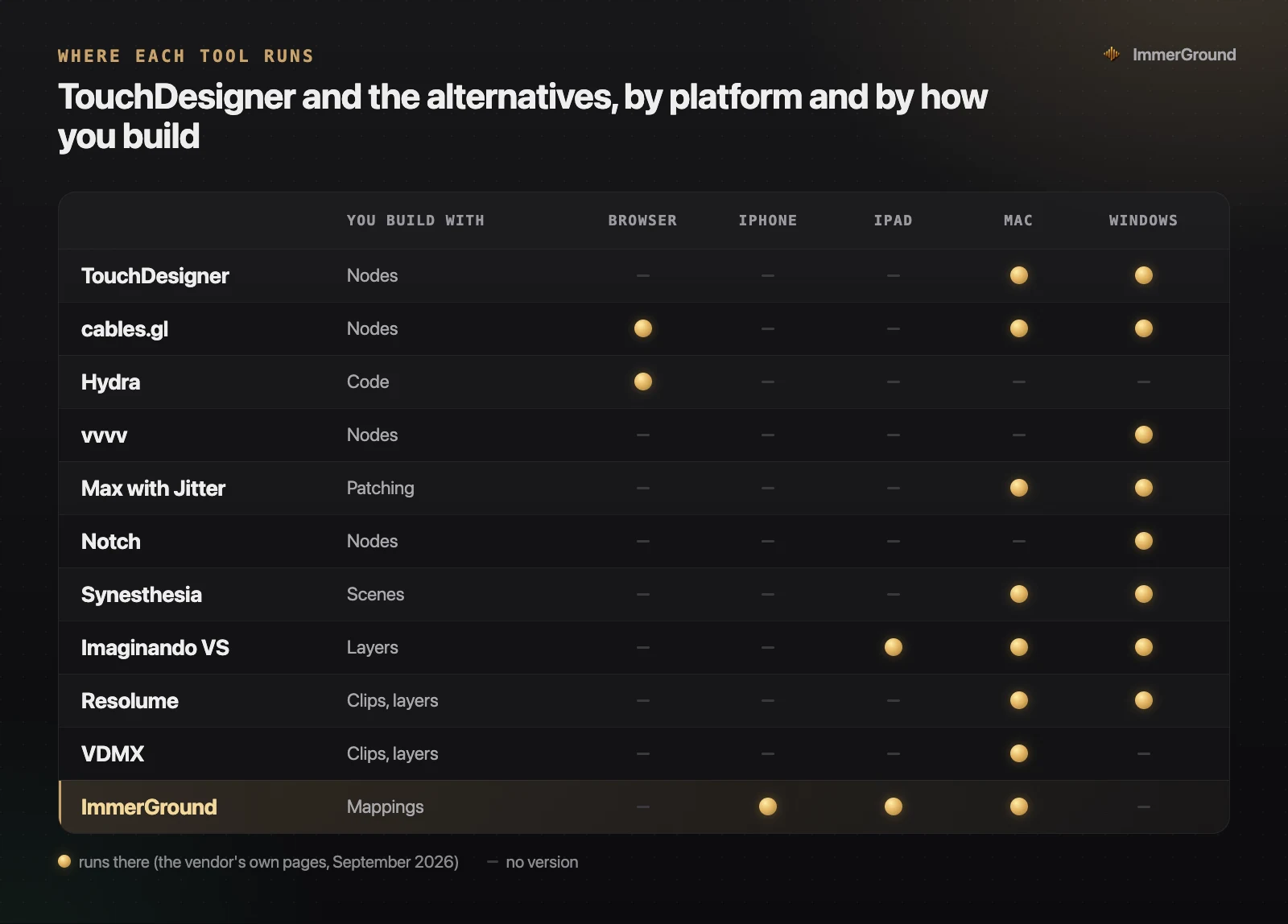
| Supported OS | macOS, Windows | macOS, Windows | iPhone, iPad, macOS |
| Free Version | Watermarked demo (no time limit) | Free Non-Commercial (1280x1280 max) | Free browser visualizer; app free to download |
| Full License Price | Avenue €299 / Arena €799 | Commercial $600 / Pro $2,200 | Pro $6.99/wk or $39.99/yr |
| Projection Mapping | Advanced in Arena (edge blending) | Custom via Kantan Mapper / SOPs | External screen output via HDMI/AirPlay |
Pricing, licensing, and platform availability compared
Pricing and licensing models represent a significant difference between these software platforms, especially for independent VJs and emerging artists.
Resolume Avenue costs €299 per computer license, while Resolume Arena costs €799. Arena adds advanced venue features such as multi-projector edge blending, DMX lighting control, SMPTE timecode sync, and screen warping. Resolume licenses are perpetual and include 12 months of free software updates. A fully functional demo version is free to download; it carries no time limit but displays a visual watermark and plays an audio reminder periodically.
TouchDesigner offers a free Non-Commercial version that contains nearly all software features, restricted to an output resolution of 1280x1280 pixels and non-paying projects. Educational licenses cost $300, Commercial licenses cost $600 (paid work, the full resolution of your graphics card, real-time H.264 and H.265 export), and Pro licenses cost $2,200 (adding multi-machine sync, frame-lock, projector calibration support and six hours of Pro support). TouchDesigner software licenses are perpetual for the purchased build version.
Neither Resolume nor TouchDesigner offers native apps for iOS or iPadOS devices. Creators seeking lightweight, portable solutions for live shows on iPad, iPhone, or Mac can use ImmerGround, which is free to download; ImmerGround Pro is $6.99 a week or $39.99 a year.
Projection mapping and stage output routing options
Delivering visuals to complex physical screens or venue architecture requires flexible output routing and warping tools.
Resolume Arena features an advanced Advanced Output editor that is widely considered the industry benchmark for fast projection mapping. You can define multiple output slices, map them to specific screen polygons, adjust perspective warping, and perform multi-projector edge blending with soft-edge curves. This allows VJs to map video loops onto complex stage structures, LED wall configurations, and architectural surfaces within minutes at the venue.
TouchDesigner provides mapping building blocks through tools like Kantan Mapper and custom 3D geometry UV mapping. Because TouchDesigner operates in 3D space, you can construct virtual 3D models of the physical stage and project virtual light directly onto those surfaces. This spatial awareness makes TouchDesigner uniquely suited for permanent architectural projection installations, dome projections, and immersive museum spaces.
For mobile and iPad VJing, apps like ImmerGround route video output directly to external displays via USB-C to HDMI adapters or AirPlay. While mobile apps focus on single-screen or mirrored stage feeds rather than complex multi-projector edge blending, they cover single-screen shows at club nights and smaller concert venues.
When to choose Resolume, TouchDesigner, or a mobile alternative
Choosing the right tool depends on your performance requirements, gig format, and hardware setup:
Choose Resolume if: You perform live VJ sets alongside club DJs, festivals, or bands where you need to mix pre-rendered video loops, layer visual content, and apply instant MIDI-driven effects. Resolume Arena is also the top choice if your gig requires complex multi-projector edge blending or DMX stage lighting integration.
Choose TouchDesigner if: You want to build custom generative art, interactive installations with depth sensors (like Kinect or LiDAR), dynamic 3D scenes, or algorithmic audio-reactive systems from scratch. TouchDesigner is the leading environment for visual developers and technical directors creating bespoke venue installations.
Choose ImmerGround if: You want fast, audio-reactive visuals driven by live microphone sound or a song file on iPhone, iPad, or Mac without spending weeks learning node networks or carrying heavy desktop setups to gigs. ImmerGround combines real-time video effects, thermal looks, motion tracking, and full MIDI pad control into a streamlined workspace.
Where to get free tools and resources for live visuals
Explore real-time visual tools and free resources to expand your performance workflow:
- Free In-Browser Audio Visualizer. Test live audio-reactive effects in your web browser at immerground.com/visualizer. Process sound from your microphone or audio files with thermal LUTs, ASCII glyphs, and kaleidoscope filters without signups. Browser testing is free. The ImmerGround app on iPhone, iPad, and Mac adds motion tracking, pad scenes and Render HD up to 4K; it is free to download, and ImmerGround Pro is $6.99 a week or $39.99 a year.
- Free VJ Loops Pack Downloads. Download 4K and 1080p CC0 VJ loop packs at immerground.com/loops. All clips are BPM-tagged and ready to import into Resolume, TouchDesigner, or ImmerGround.
- Web MIDI Monitor. Test and verify your USB or Bluetooth MIDI controller signals at immerground.com/tools/midi-tester before mapping controls in live performance apps.
What to do next
- Try the free non-commercial builds. Download the free TouchDesigner Non-Commercial version and the Resolume demo to experiment with both visual workflows on your computer.
- Test browser-based visual creation. Launch the free live visualizer at immerground.com/visualizer to test audio-reactive controls with your microphone or music tracks.
- Download free CC0 video loops. Get loop packs from our free loops page to populate your video decks in Resolume or ImmerGround.
- Install ImmerGround on iOS or macOS. Download ImmerGround on the App Store for iPhone, iPad, or Mac to perform live audio-reactive sets on Apple hardware.